
Can a Modular Steel Desk Fit Two Monitors? Office Table and A1 Desk Unit Measured
Yes on the Office Table. On the A1 Desk Unit, two 24 inch monitors fit, and two 27 inch monitors may not once bezels are added. Two 27 inch 16:9 monitors have 119.5 cm (47.1 in) of screen area between them, and two 24 inch monitors have 106.3 cm (41.8 in). The Office Table is 175.0 cm (68.9 in) wide, which leaves 55.5 cm (21.8 in) after two 27 inch screens. The A1 Desk Unit is 127.0 cm (50 in) wide, which leaves 7.5 cm (2.9 in). Those leftovers are before bezels, stands and gaps, so use them as an upper limit.
This is a fit and dimensions guide, not medical or ergonomic advice.
Step 1: Find the width of two screens
A 16:9 screen is about 0.8716 times its diagonal wide. For a 27 inch monitor that is 0.8716 × 27 = 23.5 in, or 59.8 cm. Two side by side are 119.5 cm (47.1 in). For a 24 inch monitor it is 0.8716 × 24 = 20.9 in (53.1 cm), and two are 106.3 cm (41.8 in).
This is the screen area only. Real monitors are wider because of the bezel and the housing, so take the outer width from the spec sheet of the model you plan to buy.
Step 2: Compare with the desk
| Desk | Width | Depth | Left after two 24 in screens | Left after two 27 in screens |
|---|---|---|---|---|
| Office Table | 175.0 cm / 68.9 in | 75.2 cm / 29.6 in | 68.7 cm / 27.1 in | 55.5 cm / 21.8 in |
| A1 Desk Unit | 127.0 cm / 50.0 in | 50.8 cm / 20.0 in | 20.7 cm / 8.2 in | 7.5 cm / 2.9 in |
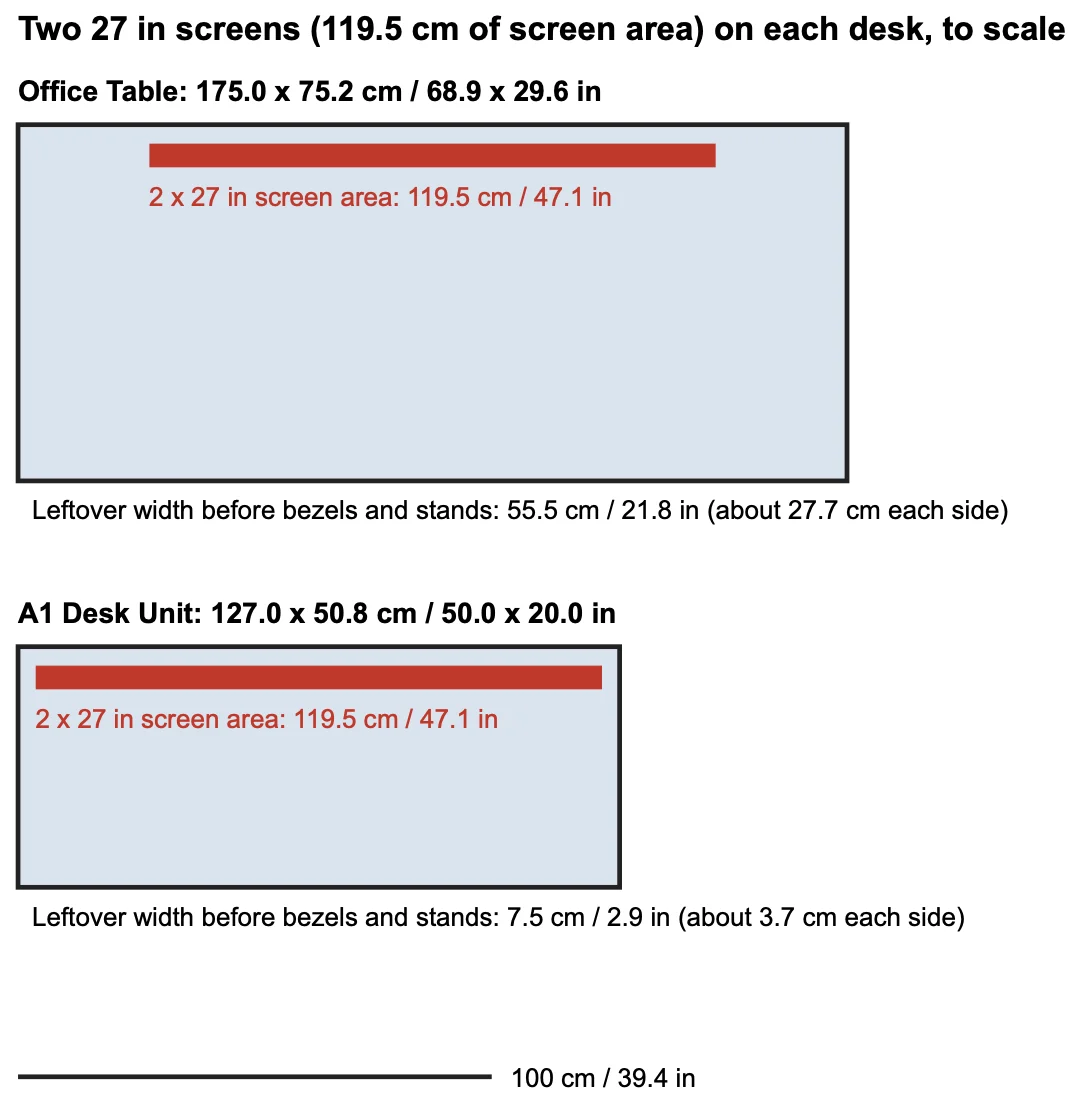
Reading the table. The Office Table leaves 68.7 cm after two 24 inch screens and 55.5 cm after two 27 inch screens, which is room for bezels, stands and a gap. The A1 Desk Unit leaves 20.7 cm after two 24 inch screens, and only 7.5 cm after two 27 inch ones. Once two bezels and a gap are added, a pair of 27 inch monitors may not fit on the A1, so check the outer width before ordering.
Step 3: Check the depth
Depth decides what is left for a keyboard once the monitor stands sit on the desk. Subtract the stand depth from the desk depth. The Office Table is 75.2 cm (29.6 in) deep and the A1 Desk Unit is 50.8 cm (20 in) deep, so the A1 leaves less room for a keyboard in front of two stands. A wall mount or a clamped arm moves the stand footprint off the desk.
Step 4: Check the weight
Compare each monitor’s weight, and the arm’s if you use one, with the manufacturer’s limits. We do not publish a desktop load rating for our desks. The 50 kg (110 lb) per shelf figure applies to shelves on our storage pieces, and there is no separate rating for a top surface.
Step 5: Decide
- Office Table: two 24 inch or two 27 inch monitors fit by width, with 55.5 cm to spare at the larger size, before bezels and stands.
- A1 Desk Unit: two 24 inch monitors fit by width with 20.7 cm to spare. Two 27 inch monitors leave 7.5 cm, so measure the real outer width first.
- Any other desk: use the same formula, then add the bezel width and the gap you want between screens.
The dimensions come from our catalog for the Office Table and the A1 Desk Unit, in cm and inches. Desk height is a separate question, covered in Desk Height by Body Height. For storage that fits the same workspace, see Best Storage for a Small Home Office.
Fill-in checklist
| Measure | Your number (cm / in) |
|---|---|
| Monitor diagonal | |
| Screen area width, one monitor (0.8716 × diagonal) | |
| Outer width from the spec sheet, one monitor | |
| Gap between monitors | |
| Total width needed | |
| Desk width | |
| Stand depth, one monitor | |
| Desk depth minus stand depth | |
| Monitor and arm weights |
Frequently asked questions
Can a modular steel desk fit two monitors?
It can, if the desk is wide enough for both screens plus their bezels and stands. Two 27 inch 16:9 monitors have 119.5 cm (47.1 in) of screen area between them. The Office Table is 175.0 cm (68.9 in) wide and the A1 Desk Unit is 127.0 cm (50 in) wide, so the second leaves very little margin.
How wide are two 27 inch monitors?
The screen area of a 16:9 monitor is about 0.8716 times its diagonal wide. A 27 inch screen is about 59.8 cm (23.5 in) wide, so two side by side span about 119.5 cm (47.1 in) before bezels, stands and any gap. Use the spec sheet width for the final check.
Does a desk need a load rating for monitors?
Check the weight of each monitor and any arm against the manufacturer’s limits. We do not publish a desktop load rating for our desks, and the 50 kg per shelf figure on our storage pieces is a shelf rating, not a desktop rating.
Can I clamp a monitor arm to the desk?
We have not published clamp compatibility for our desks. Check the edge thickness and the underside clearance against the arm’s clamp range, or use freestanding stands.
How deep should the desk be for two monitors?
Subtract the depth of each monitor’s stand or arm base from the desk depth to see what is left for a keyboard. The Office Table is 75.2 cm (29.6 in) deep and the A1 Desk Unit is 50.8 cm (20 in) deep. Stand depth is on the monitor’s spec sheet.